Introducing "Sandwich Nights": Why Some Dates Become Unbookable Without You Realising
Learn why some dates become impossible to book even though you have availability, and how Channex now highlights these "Sandwich Nights" automatically.

If you manage availability across multiple OTAs, you've probably seen this situation:
- You have 1 room left,
- That room has a minimum stay of 2 nights,
- But tomorrow is already sold out.
Result?
Tonight becomes impossible to book — even though you technically still have availability.
This is what we're calling Sandwich Nights (other systems call it "orphan gaps", "trapped nights", "stranded nights", etc.).
It simply means: a night is unsellable because the stay rule is longer than the space available around it.
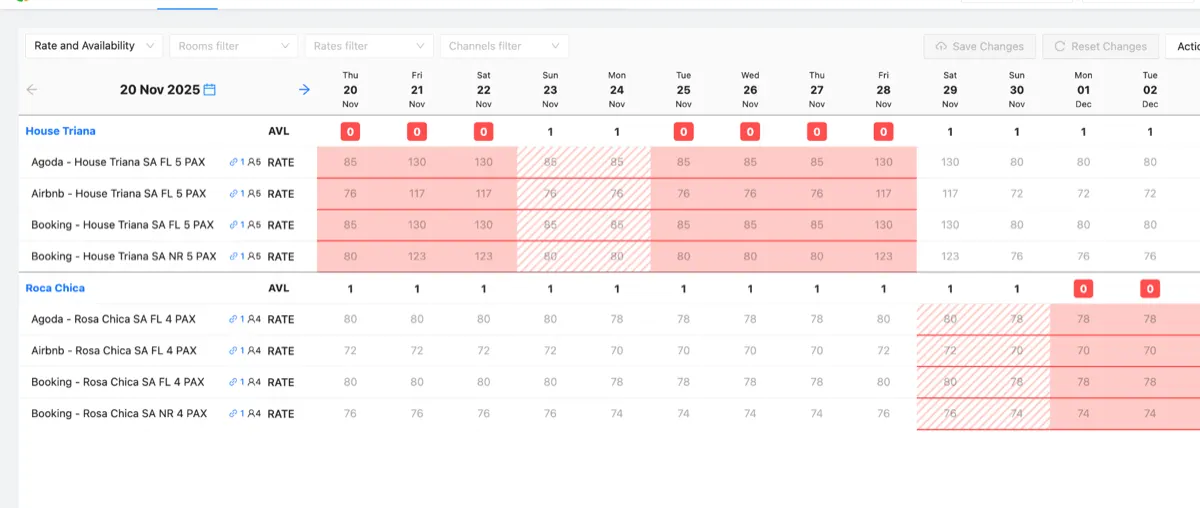
We've now added a clear visual indicator in Channex to show you exactly when this happens. In the calendar, these dates appear with red stripes, like this:
Why this happens (in plain English)
Minimum stays are great when your occupancy is high.
But minimum stays can backfire if you're not watching the gaps.
A "Sandwich Night" occurs when:
- The room is available tonight,
- But you don't have enough availability tomorrow to satisfy the min-stay rule.
Example:
- Tonight = 1 room left
- Min stay = 2 nights
- Tomorrow = 0 rooms
A guest can't book 2 nights…
so the system blocks tonight entirely.
You didn't close it — the restriction did.
Many hotels think this is an OTA bug. It's not.
It's just math meets rules.
Why this matters for hotels
Hotels often lose money without realising they've boxed themselves in with restrictions.
A Sandwich Night usually means:
- Lost revenue (the night can't be sold at all)
- Lower occupancy
- Confusing performance dips ("Why didn't this night sell?")
It's a silent killer because the night looks available… until you test it or a guest tries to book.
How Channex fixes this
We now highlight these nights automatically on the Rates & Availability screen.
You'll see red diagonal stripes across any night that is available but unsellable due to your own restrictions.
This does two things:
1. It warns you before you lose the night
You can immediately see where you need to lower the minimum stay or adjust restrictions.
2. It gives PMSs transparency
Many PMS support teams spend hours explaining "why a night didn't sell."
Now they can just point to the stripes.
What hotels should do when they see a Sandwich Night
You've got two simple options:
Option A — Reduce the minimum stay for that date
If demand is low or you want to fill rooms, this is the realistic option.
Option B — Accept the night will remain unsellable
Sometimes hotels purposely keep min stays strict.
But at least now you know the consequence.
Either way, the key is visibility.
You can only manage what you can see.
Common mistakes hotels make (and why this feature helps)
1. "We never closed that date — why is it blocked?"
Because the rule blocked it, not you.
2. "The PMS shows availability… but Booking.com says sold out."
Correct.
The PMS only shows room count — not whether the stay rule can be satisfied.
3. "We don't have any orphan gaps."
Nearly every hotel does.
Nobody checks every date against every combination of restrictions manually.
Summary
Sandwich Nights = Available room that cannot be booked because of min-stay rules.
Channex now highlights these with red stripes so you can immediately see and fix them.
This feature helps you:
- Avoid accidental unsellable nights
- Boost occupancy
- Reduce OTA confusion
- Save support time
- Spot gaps caused by your own rules